Details
-
Type:
 Bug
Bug
-
Status: Closed
-
Priority:
 Major
Major
-
Resolution: Fixed
-
Affects Version/s: EE-2.0.0, EE-1.8.2.GA_P03
-
Fix Version/s: EE-2.0.0.GA_P01, EE-1.8.2.GA_P04
-
Component/s: Facelet Components
-
Labels:None
-
Environment:IE7
-
Workaround Exists:Yes
-
Workaround Description:See comment on August 30th, 2011.
Description
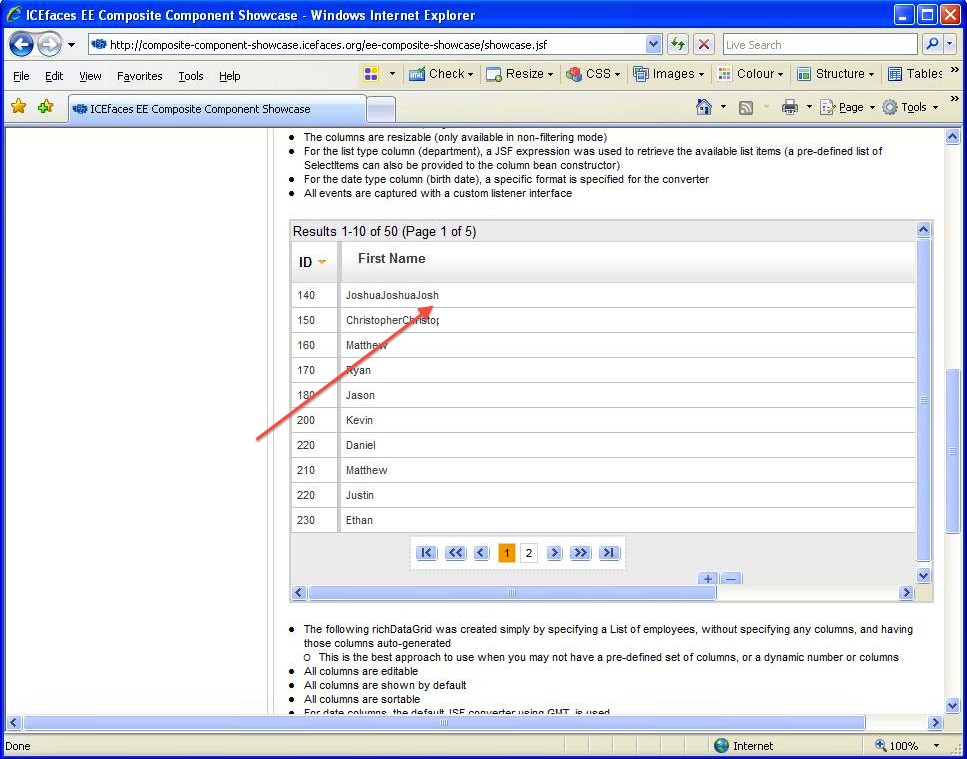
When editing a field in the richDataGrid and inputting a very long text string, the column length is as expected but the text is truncated. This can be reproduced using the component showcase and IE7.
Activity
| Field | Original Value | New Value |
|---|---|---|
| Attachment | 10317_screen.jpg [ 13452 ] |
| Salesforce Case | [5007000000HzAGo] |
| Affects Version/s | EE-2.0.0 [ 10256 ] |
| Workaround Description | See comment on August 30th, 2011. | |
| Workaround Exists | [Yes] |
| Status | Open [ 1 ] | In Progress [ 3 ] |
Revision: 29357
Author: philip.breau
Date: 5:52:04 PM, Tuesday, November 15, 2011
Message:
IPCK-319 RichDataGrid text truncated after inputting a long value in edit screen
Modified : /icepack/trunk/icepack/composite-components/web/datatable/richDataGrid.xhtml
Revision: 29358
Author: philip.breau
Date: 6:55:33 PM, Tuesday, November 15, 2011
Message:
IPCK-319 RichDataGrid text truncated after inputting a long value in edit screen
Modified : /icefaces-ee2/trunk/icefaces-ee/ee-comps/ee-composite/web/datatable/richDataGrid.xhtml
Show
 Philip Breau
added a comment - Revision: 29357
Author: philip.breau
Date: 5:52:04 PM, Tuesday, November 15, 2011
Message:
IPCK-319 RichDataGrid text truncated after inputting a long value in edit screen
Modified : /icepack/trunk/icepack/composite-components/web/datatable/richDataGrid.xhtml
Revision: 29358
Author: philip.breau
Date: 6:55:33 PM, Tuesday, November 15, 2011
Message:
IPCK-319 RichDataGrid text truncated after inputting a long value in edit screen
Modified : /icefaces-ee2/trunk/icefaces-ee/ee-comps/ee-composite/web/datatable/richDataGrid.xhtml
Philip Breau
added a comment - Revision: 29357
Author: philip.breau
Date: 5:52:04 PM, Tuesday, November 15, 2011
Message:
IPCK-319 RichDataGrid text truncated after inputting a long value in edit screen
Modified : /icepack/trunk/icepack/composite-components/web/datatable/richDataGrid.xhtml
Revision: 29358
Author: philip.breau
Date: 6:55:33 PM, Tuesday, November 15, 2011
Message:
IPCK-319 RichDataGrid text truncated after inputting a long value in edit screen
Modified : /icefaces-ee2/trunk/icefaces-ee/ee-comps/ee-composite/web/datatable/richDataGrid.xhtml
| Status | In Progress [ 3 ] | Resolved [ 5 ] |
| Fix Version/s | EE-2.0.0.GA_P01 [ 10270 ] | |
| Fix Version/s | EE-1.8.2.GA_P04 [ 10281 ] | |
| Resolution | Fixed [ 1 ] |
| Status | Resolved [ 5 ] | Closed [ 6 ] |
The fix is as follows:
richDataGrid.xhtml line 62:
style="#
{browser.lessThanIe8 ? 'clear:both; float: left;' : '' }">
is replaced with:
style="#
{browser.lessThanIe8 ? 'clear:both;' : '' }">
The cause of the cutoff issue in IE7 was due to the float: left. This solution works for resolution 1024x768 or lower.