Details
-
Type:
 Bug
Bug
-
Status: Closed
-
Priority:
 Minor
Minor
-
Resolution: Fixed
-
Affects Version/s: 3.0.RC2
-
Fix Version/s: 3.0
-
Component/s: ACE-Components
-
Labels:None
-
Environment:ICEfaces 3, ace:subMenu
-
Assignee Priority:P1
Description
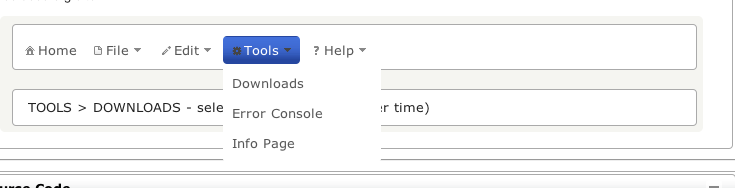
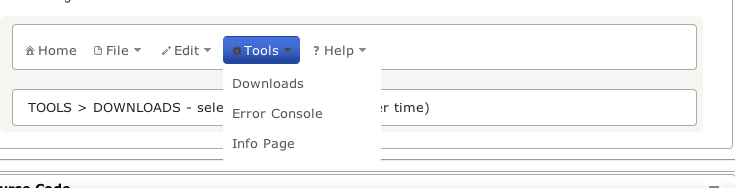
Not sure if this is just a theme styling issue, or a component issue.
Activity
| Field | Original Value | New Value |
|---|---|---|
| Attachment | Screen Shot 2012-01-13 at 12.02.26 PM.png [ 13991 ] |
| Salesforce Case | [] | |
| Assignee Priority | P1 | |
| Assignee | Arturo Zambrano [ artzambrano ] | |
| Priority | Major [ 3 ] | Minor [ 4 ] |
| Repository | Revision | Date | User | Message |
| ICEsoft Public SVN Repository | #27255 | Thu Jan 19 09:04:40 MST 2012 | art.zambrano | |
| Files Changed | ||||
 MODIFY
/icefaces3/trunk/icefaces/ace/component/resources/icefaces.ace/wijmo/wijmo.js
MODIFY
/icefaces3/trunk/icefaces/ace/component/resources/icefaces.ace/wijmo/wijmo.js
|
| Status | Open [ 1 ] | Resolved [ 5 ] |
| Resolution | Fixed [ 1 ] |
| Status | Resolved [ 5 ] | Closed [ 6 ] |
This appears to have been removed from all menus even though a good deal of Wijmo code uses hasClass etc. to check for it. This modification could have negative side effects.
Is it clear why we had to remove this instead of style around it? If this is a conflict with our own CSS we should refactor our CSS, if it's a deficiency in Wijmo we should get them to fix it.
I remember this just wasn't playing nice with Themeroller themes. It was overriding a lot of the styling, and there wasn't anything else that could be done, because this class was being added dynamically. I made sure removing it didn't affect anything else, so I removed it. It has been working fine for more than a year.
In the current Wijmo code only checks for this class (i.e. hasClass()) on the root menu, not the submenus, and the only purpose of this is to add that class if it wasn't there. So, if the new code doesn't check for this class somewhere else, then there's no need to change this fix.
Fixed at revision 27255.
I had to modify the wijmo code (wijmo/wijmo.js). I removed the ui-helper-reset class from the submenus, in order to allow the border to appear.